|
Main Menu > Inventory Control > Office Choice > Office Choice Product Data Enquiry Main Menu > Sales Ordering > Web Orders > Office Choice Product Data Enquiry |

The Office Choice Product Data Enquiry program allows users to view detailed information of Office Choice Item Code/Catalogue Products, including those that are not in your system.
Note: All information supplied in an Office Choice Product Data Enquiry excluding the BBS product and BBS Vendor is downloaded from the Office Choice Data Portal.
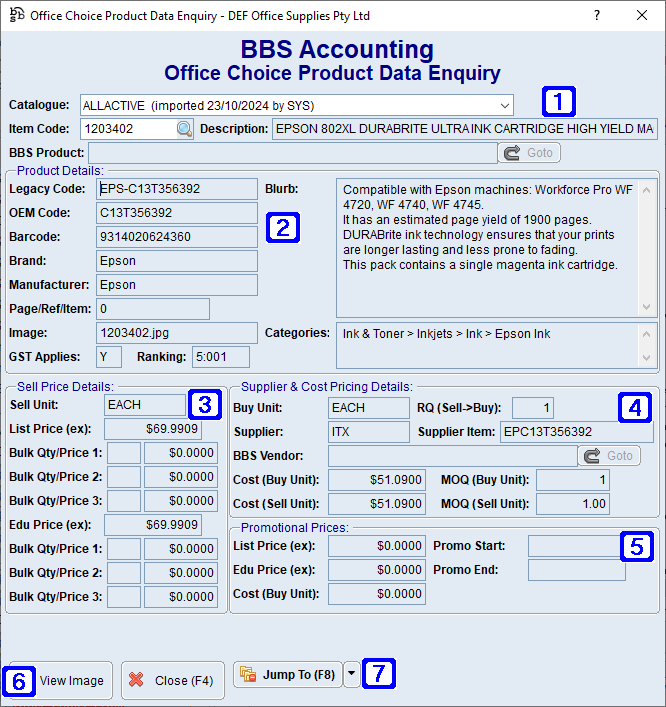
Office Choice Product Data Enquiry Screen
|
Catalogue - The Office Choice catalogue. Clicking the drop down arrow will allow users to select from a list of catalogues. Item Code - The Office Choice Item Code. Description - Displays the description of the selected Item Code as per the Office Choice data portal. BBS Product - Displays the BBS product code and description where the Item Code has been created and linked to the selected Item Code in your system. Goto - Navigates users to Global Inventory Enquiry of the BBS Product code. |
|
Product Details: •Legacy Code - Displays the Office Choice code for the selected Item Code. •OEM Code - Displays the original equipment manufacturers code for the selected Item Code. •Barcode - Displays the barcode for the selected Item Code. •Brand - Displays the brand of the selected Item Code. •Manufacturer - Displays the manufacturer of the selected Item Code. •Page/Ref/Item - Displays the page, reference and item number for the selected Item Code (ie. where the product appears in the selected or primary catalogue). •Image - Displays the image file name of the selected Item Code. •GST Applies - Displays Y where GST applies to the selected Item Code or N where the selected Item Code is exempt from GST. •Ranking - Displays the ranking of the selected Item Code. •Blurb - A detailed description of the selected Item Code. •Categories - Displays the category tree the selected Item Code belongs to. |
|
Sell Price Details: •Sell Unit - Displays the unit of measure the selected Item Code is sold in. •List Price (ex) - Displays the list price excluding GST for the selected Item Code. •Bulk Qty/Price 1 - Displays the quantity required to be purchased for the bulk quantity sell price excluding GST to apply. •Bulk Qty/Price 2 - Displays the quantity required to be purchased for the bulk quantity sell price excluding GST to apply. •Bulk Qty/Price 3 - Displays the quantity required to be purchased for the bulk quantity sell price excluding GST to apply. •Edu Price (ex) - Displays the education price excluding GST for the selected Item Code. •Bulk Qty/Price 1 - Displays the quantity required to be purchased for the bulk quantity sell price excluding GST to apply. •Bulk Qty/Price 2 - Displays the quantity required to be purchased for the bulk quantity sell price excluding GST to apply. •Bulk Qty/Price 3 - Displays the quantity required to be purchased for the bulk quantity sell price excluding GST to apply. |
|
Supplier & Cost Pricing Details: •Buy Unit - Displays the unit of measure the selected Item Code is purchased in. •RQ (Sell->Buy) - Displays the conversion factor between the sell unit of measure and buy unit of measure. •Supplier - Displays the Office Choice supplier code for the selected Item Code. •Supplier Item - Displays the supplier item number for the selected Item Code. •BBS Vendor - Displays the BBS Vendor code and name for the Office Choice supplier of the selected Item Code. •Goto - Navigates users to Global Vendor Enquiry for the BBS Vendor. •Cost (Buy Unit) - Displays the cost of the buy unit of measure. •MOQ (Buy Unit) - Displays the minimum order quantity of the buy unit of measure. •Cost (Sell Unit) - Displays the cost of the sell unit of measure. •MOQ (Sell Unit) - Displays the minimum order quantity of the sell unit of measure. |
|
Promotional Prices: •List Price (ex) - Displays the list price excluding GST for the selected Item Code when promotional pricing is valid. •Edu Price (ex) - Displays the education price excluding GST for the selected Item Code when promotional pricing is valid. •Cost (Buy Unit) - Displays the cost of the buy unit of measure while promotional pricing is valid. •Promo Start - Displays the start date of the promotional pricing. •Promo End - Displays the end date of the promotional pricing. |
|
View Image - Allows users to view the image of the selected Item Code. |
|
Jump To (F8) - (The options available in the Jump To button will be determined by users access). 1. Create Product Code - Navigates users to Product Masterfile Maintenance. |